Track your progress through the courses
IBM Quantum's courses run to dozens of lessons. doQumentation marks what you have read and what you have run, so you can see how far you are and pick up where you stopped, with no account and no sign-up.
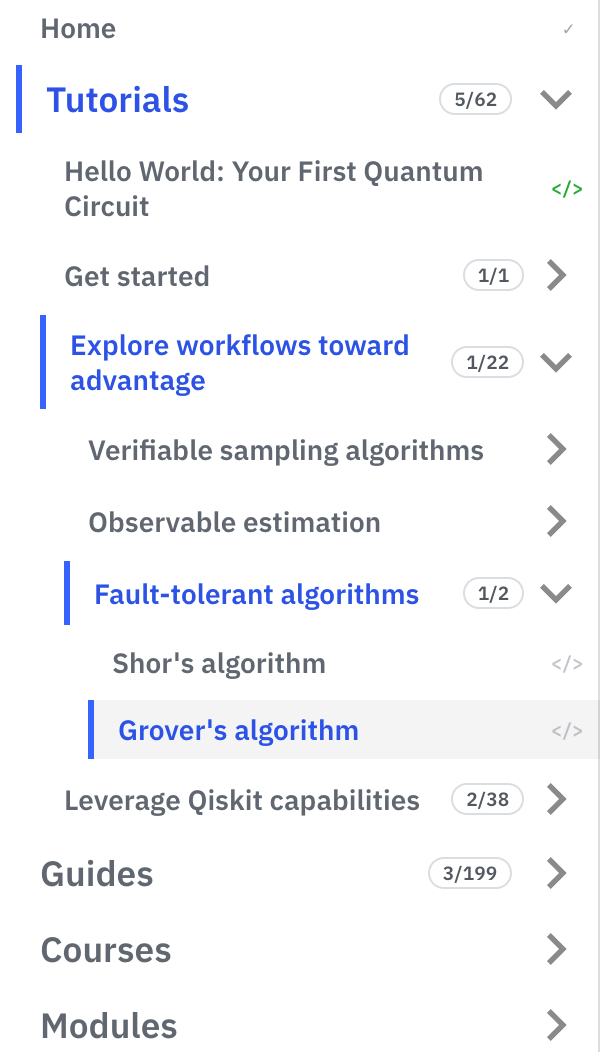
Read and run, at a glance
Pages you have read get a checkmark (✓) in the sidebar. Notebook pages carry a </> mark that turns blue once you have read the page and green once you have run its code. Each section shows a counter such as 3/10.
Continue where you left off
The home page shows a "Continue where you left off" card with the last page you read, your five most recent pages and your bookmarks. Star any page to bookmark it.
Stays in your browser
Progress and bookmarks are kept in your browser, not in an account. They follow you between the language versions of the site on the same browser, and you can clear them in Settings.
Try it on these pages
Frequently asked questions
Do I need an account to track my progress?
No. Progress and bookmarks are kept in your browser.
Does my progress move to another device?
No. Each browser keeps its own progress; clearing the browser data clears it too.
How do I reset my progress?
Click a page's mark in the sidebar to clear that page, or clear a section or all of your progress in Settings.