Run your first Qiskit Serverless workload remotely
Package versions
The code on this page was developed using the following requirements. We recommend using these versions or newer.
qiskit[all]~=1.4.0
qiskit-ibm-runtime~=0.36.1
qiskit-ibm-catalog~=0.4
Qiskit Serverless is getting an upgrade, and its features are changing fast. During this development phase, find release notes and the most recent documentation at the Qiskit Serverless GitHub page.
This section explores how to use qiskit-ibm-catalog to list programs available in Qiskit Serverless, pass inputs into these programs, run them remotely, check their status, and retrieve results and logs.
Be sure you have followed the workflow in Write your first Qiskit Serverless program before you begin.
List programs available
You can use QiskitServerless.list() to fetch a list of the available programs to run with Qiskit Serverless. This includes the previously uploaded transpile_remote_serverless.
# Added by doQumentation — installs the packages this notebook needs if they are missing
import importlib.util

_needed = {"qiskit": "qiskit", "qiskit_ibm_catalog": "qiskit-ibm-catalog", "qiskit_ibm_runtime": "qiskit-ibm-runtime"}
_missing = [pip for module, pip in _needed.items()
            if importlib.util.find_spec(module) is None]
# One at a time, so a package that fails to install does not block the others
for _pip in _missing:
    %pip install -q {_pip}
if not _missing:
    print("\u2713 All required packages are installed")
from qiskit_ibm_catalog import QiskitServerless

serverless = QiskitServerless()
next(
    program
    for program in serverless.list()
    if program.title == "transpile_remote_serverless"
)
QiskitFunction(transpile_remote_serverless)
Run an uploaded program and pass inputs
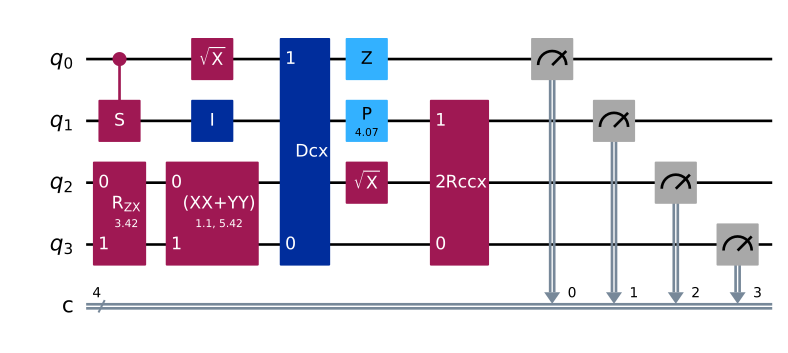
First, set up your inputs. Your program has three inputs: circuits, backend, and optimization_level. You can use random_circuit to create 30 random circuits:
from qiskit.circuit.random import random_circuit

qc_random = [(random_circuit(4, 4, measure=True, seed=i)) for i in range(10)]
qc_random[0].draw(output="mpl", idle_wires=False)
Next, use QiskitRuntimeService and least_busy to select a backend:
from qiskit_ibm_runtime import QiskitRuntimeService

service = QiskitRuntimeService()
backend = service.least_busy(operational=True, simulator=False)
print(backend.name)
Set your optimization level:
optimization_level = 3
Select your program with serverless.load('PROGRAM_NAME'):
transpile_remote_serverless = serverless.load("transpile_remote_serverless")
Next, pass your inputs and run it in a pythonic fashion as follows:
job = transpile_remote_serverless.run(
    circuits=qc_random,
    backend=backend.name,
    optimization_level=optimization_level,
)
job.job_id
'118256c5-bbb0-4ea8-9e9f-51aac2220aef'
Check job status
With your Qiskit Serverless job_id, you can check the status of running jobs. This includes the following statuses:
QUEUED: The remote program is in the Qiskit Serverless queue. The queue priority is currently based on how much you've used Qiskit ServerlessINITIALIZING: The remote program is starting; this includes setting up the remote environment and installing dependenciesRUNNING: The program is running. At this stage, if you haveprint()outputs in your program, you can retrieve logs usingjob.logs()DONE: The program is complete, and you can retrieve data stored insave_result()withjob.results()
You can also set more detailed job statuses in Manage Qiskit Serverless compute and data resources.
job.status()
'QUEUED'
# This cell is hidden from users, it checks the job status
assert _ in ["QUEUED", "INITIALIZING", "RUNNING", "DONE"]  # noqa: F821
Currently, the IBM Quantum workloads table only reflects IBM Quantum Compute Service workloads. Use job.status() to see your Qiskit Serverless workload's current status.
You've successfully run your first Qiskit Serverless program!
Retrieve logs and results
As mentioned before, once a program is RUNNING, you can use job.logs() to fetch logs created from print() outputs:
logs = job.logs()
print(logs)
No logs yet.
At any time, you can also cancel a job:
job.stop()
'Job has been stopped.'
Once a program is DONE, you can use job.results() to fetch the result stored in save_result():
# We can't get results from a cancelled job, so we'll fetch a completed one instead
completed_job = next(
    job for job in serverless.jobs() if job.status() == "DONE"
)
completed_job.result()
{'transpiled_circuits': [<qiskit.circuit.quantumcircuit.QuantumCircuit at 0x7f93eca64810>,
  <qiskit.circuit.quantumcircuit.QuantumCircuit at 0x7f93ec5e5310>,
  <qiskit.circuit.quantumcircuit.QuantumCircuit at 0x7f93ec5d5310>,
  <qiskit.circuit.quantumcircuit.QuantumCircuit at 0x7f93ec58b490>,
  <qiskit.circuit.quantumcircuit.QuantumCircuit at 0x7f93ec57d310>,
  <qiskit.circuit.quantumcircuit.QuantumCircuit at 0x7f93ec535950>,
  <qiskit.circuit.quantumcircuit.QuantumCircuit at 0x7f93ec523c90>,
  <qiskit.circuit.quantumcircuit.QuantumCircuit at 0x7f93ec60a990>,
  <qiskit.circuit.quantumcircuit.QuantumCircuit at 0x7f93ec5527d0>,
  <qiskit.circuit.quantumcircuit.QuantumCircuit at 0x7f93ec4152d0>]}
List jobs previously run with Qiskit Serverless
You can use jobs() to list all jobs submitted to Qiskit Serverless:
old_jobs = serverless.jobs()
old_jobs
[<Job | 118256c5-bbb0-4ea8-9e9f-51aac2220aef>,
 <Job | e9a36469-7d6b-4f00-bf91-78709ebdbbff>,
 <Job | 4efd601b-8f61-4c8e-b14a-0b8a9c649dc0>,
 <Job | 87cd22c7-8eb9-4606-bdb4-befe946e9e9b>,
 <Job | be9a6dfd-0830-4250-aa60-acdd05bb8818>,
 <Job | 479513dd-6a76-4c3e-ba49-bb21351b9a05>,
 <Job | f9c20c31-be46-41b3-97ac-99f7be61f89e>,
 <Job | 37fa2489-4449-4bfb-974e-9d9a9ec3cc21>,
 <Job | b754c4e8-6817-48db-9bb9-74c151d6349a>,
 <Job | 78bc6744-b417-48cb-8e01-59bb63bcc2be>]
Next steps
- Explore compute and data management tools available to your program, including parallelization.